Home/Blog/PixelRead AI OCR: Unlocking the Unseen Language of Documents in the AI Office
human + AI workflows
PixelRead AI OCR: Unlocking the Unseen Language of Documents in the AI Office
PixelRead AI OCR: Unlocking the Unseen Language of Documents in the AI Office In an era defined by digital transformation, the sheer volume of information contained within document
14 MIN READ
21 Aug 2026
human + AI workflows
PixelRead AI OCR: Unlocking the Unseen Language of Documents in the AI Office
In an era defined by digital transformation, the sheer volume of information contained within documents often remains an untapped resource. Traditional methods of extracting this data are slow, prone to error, and simply cannot keep pace with modern business demands. This is where advanced AI OCR solutions, such as PixelRead AI OCR, step in, fundamentally redefining how organizations capture, translate, and understand document-based information, paving the way for truly intelligent digital workflows and collaborative AI offices.
01The Unseen Language of Documents: Why AI OCR is Redefining Digital Workflows
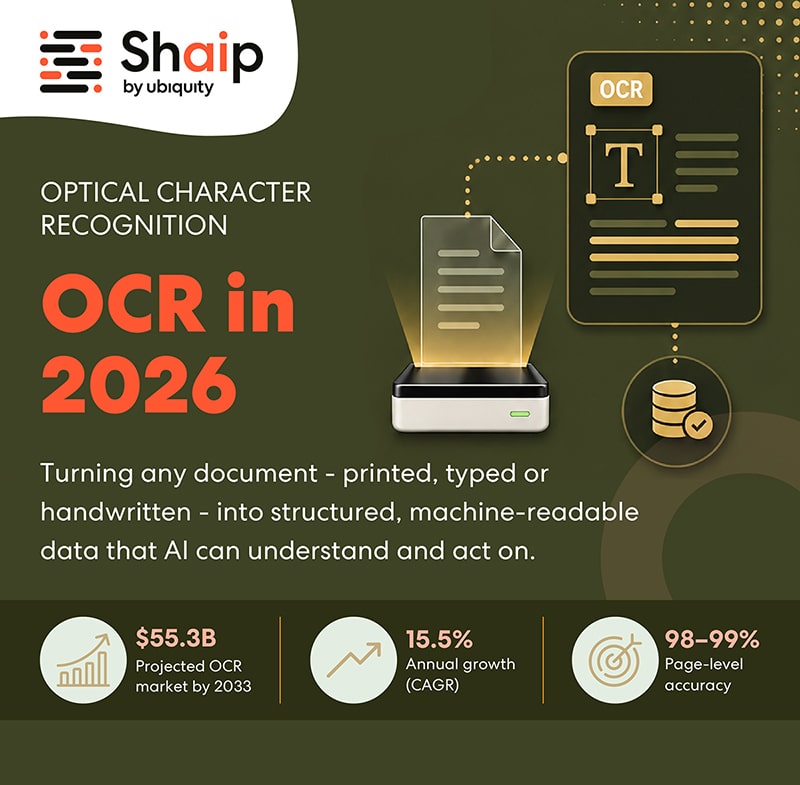
Documents, whether printed or handwritten, contain a wealth of information that, until recently, required significant human effort to digitize and process. Optical Character Recognition (OCR) technology emerged to address this, converting various types of documents, such as scanned paper documents, PDFs, or images, into editable and searchable data. However, traditional OCR often struggled with inconsistencies, complex layouts, and low-quality inputs, limiting its scalability and accuracy. It typically focused on basic text recognition, often falling short when faced with nuanced document structures or diverse content formats.
Want your team to run this workflow with AI-native execution?
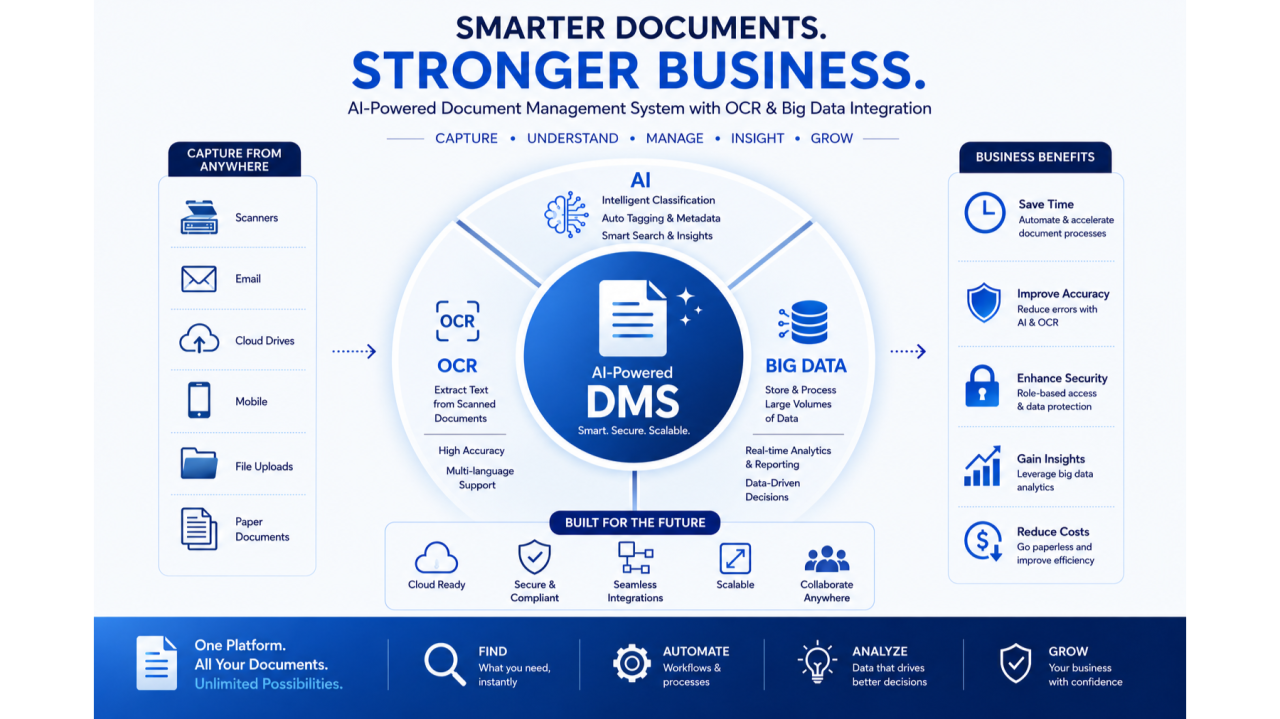
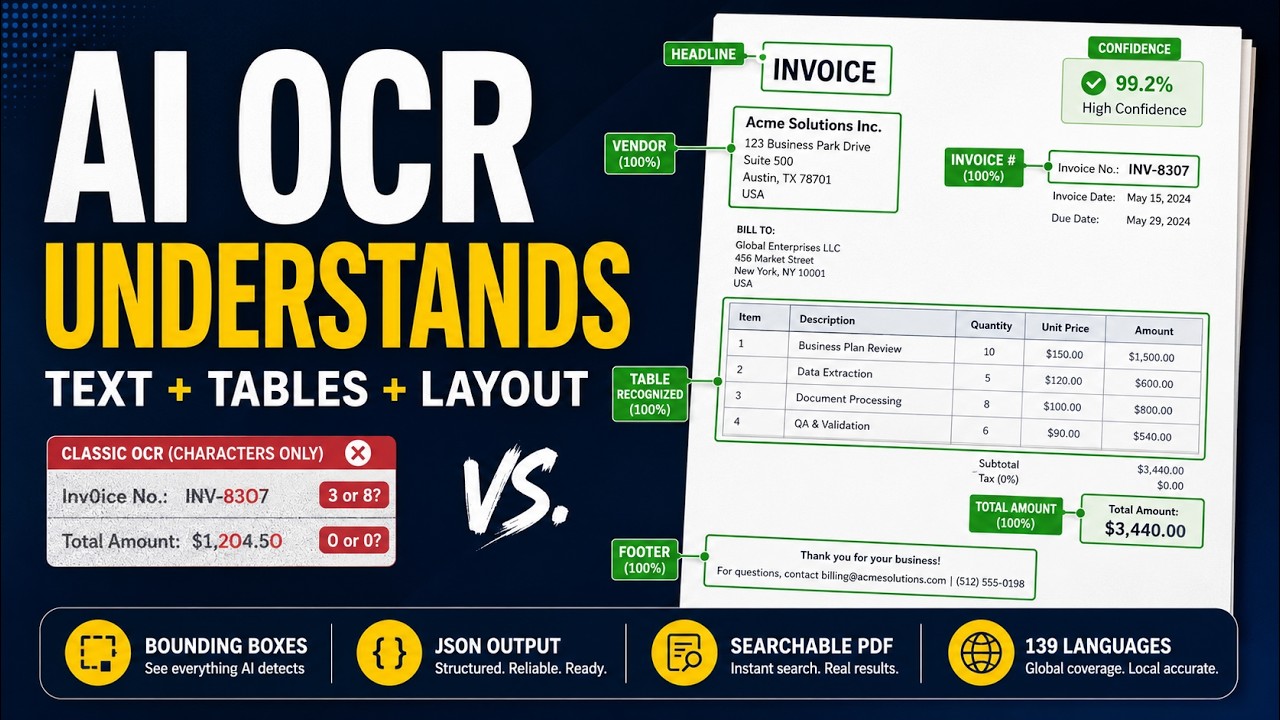
AI OCR, or AI-powered Optical Character Recognition, represents a significant leap forward by enhancing traditional OCR with artificial intelligence. This evolution introduces capabilities like AI-powered accuracy, scalability, and automation, transforming simple text recognition into comprehensive document comprehension. Unlike its predecessors, AI OCR leverages advanced machine learning models to not only extract text but also to understand its context, classify documents, and extract structured data from unstructured content. This allows for the conversion of text in images, PDFs, or scans into machine-readable text, often integrating with workflows for document ingestion, search, extraction, and export.
Solutions like PixelRead AI OCR exemplify this advancement by turning any text on a user's Mac screen into actionable information. Users can select text directly or press a shortcut to draw a region over an image, instantly making that text usable. This capability highlights a key benefit of AI OCR: its ability to make previously inaccessible information immediately available for digital processing, dramatically improving efficiency in personal and professional workflows. The strategic shift from merely recognizing characters to understanding the entire document's content is what truly redefines digital workflows, enabling businesses to unlock valuable insights at scale.
02How AI OCR Works: Beyond Simple Text Recognition
Understanding the mechanics of AI OCR reveals its sophisticated capabilities compared to traditional methods. The process involves several interconnected stages, each enhanced by AI to ensure higher accuracy and deeper comprehension. It begins with document capture and image enhancement, where the system prepares the input for recognition. This can involve deskewing documents or improving image quality to optimize text detection.
Following enhancement, layout analysis is performed, which is crucial for understanding the structure of a document. AI OCR solutions can detect blocks, paragraphs, lines, words, and even individual symbols from various file formats like PDFs and images. This analysis allows the system to differentiate between various elements, such as headings, body text, tables, and images, ensuring that the extracted text retains its original context and formatting as much as possible.
Text recognition then takes place, converting the visual characters into machine-readable text. This stage is significantly improved by AI, which can handle a wider range of fonts, sizes, and even handwritten text with greater accuracy than traditional OCR engines. After text is recognized, AI OCR moves into document classification, where it categorizes the document based on its content and structure. This is followed by data extraction and validation, a critical step where specific pieces of information, such as names, dates, or financial figures, are identified and extracted. AI models can validate this extracted data against predefined rules or external sources, further increasing reliability.
One of the most powerful aspects of AI OCR is its context understanding and the integration of Generative AI (GenAI). This allows the system to not only extract data but also to interpret its meaning within the broader document and even generate new insights. For complex or ambiguous cases, a
human-in-the-loop approach can be incorporated, where a person reviews and corrects outputs that the AI flags as uncertain. This combination of automation and oversight helps maintain high accuracy while still delivering the speed benefits of AI-driven processing.
03Key Capabilities That Make PixelRead AI OCR Stand Out
What separates a practical OCR tool from a transformative one is not just recognition accuracy, but how seamlessly it fits into everyday work. PixelRead AI OCR is designed around that principle. Rather than forcing users to upload files into a separate system and wait for results, it brings OCR directly into the flow of work on a Mac, reducing friction at the exact moment information is needed.
A major strength is its ability to capture text from almost anywhere on the screen. Whether the source is a PDF viewer, a browser page, a scanned image, a presentation slide, or a screenshot, users can select the relevant area and extract the text immediately. This is especially valuable when working with documents that are not easily copyable, such as image-based reports, locked PDFs, or legacy materials that were never digitized properly.
Another important capability is speed. In many office environments, the delay between seeing information and being able to use it is what slows productivity. PixelRead AI OCR shortens that gap by making text available for copying, searching, translation, or downstream use within seconds. For tasks like quoting from a report, summarizing a memo, or transferring data into another application, that speed adds up quickly across an entire team.
Accuracy also matters, particularly when dealing with business-critical information. AI OCR tools are increasingly capable of handling mixed fonts, varied layouts, and lower-quality scans that would typically cause errors in older OCR systems. This is especially useful in environments where documents are inconsistent, such as legal intake, finance operations, customer support, research, and administrative processing. Even when the source material is imperfect, AI-enhanced recognition can often recover usable text with far less manual correction.
PixelRead AI OCR also supports a more flexible way of interacting with information. Instead of treating documents as static files, it turns them into active content that can be moved into workflows, notes, spreadsheets, chat tools, or knowledge bases. That shift may seem small at first, but it changes how people think about document handling. Rather than retyping or reformatting information, they can focus on interpretation and decision-making.
04Practical Use Cases Across the AI Office
The value of AI OCR becomes clearest when applied to real work. In an AI office, documents are not isolated artifacts; they are inputs to broader processes. PixelRead AI OCR helps teams reduce repetitive manual effort in a wide range of scenarios.
Finance and accounting
Finance teams often deal with invoices, receipts, statements, purchase orders, and tax forms. These documents frequently arrive in mixed formats and from different sources, making manual entry both time-consuming and error-prone. AI OCR can extract vendor names, invoice numbers, totals, due dates, and line items, helping teams accelerate accounts payable and reconciliation workflows. Even when documents are scanned poorly or formatted inconsistently, AI-based extraction can reduce the amount of cleanup required before data is entered into accounting systems.
Legal and compliance
Legal professionals spend a significant amount of time reviewing contracts, filings, policies, and evidence. OCR tools that can accurately capture text from scanned pages or screenshots help legal teams search through large volumes of material more efficiently. In compliance work, the ability to quickly extract clauses, dates, signatures, and reference numbers can support faster audits and document reviews. AI OCR does not replace legal judgment, but it can dramatically reduce the time spent on repetitive document handling.
Operations and administration
Operational teams often manage forms, applications, shipping documents, internal memos, and vendor paperwork. These materials may come from multiple channels and in different formats, which makes standardization difficult. AI OCR can help normalize this information so it can be routed, filed, or analyzed more effectively. For example, a team member can capture a section of a scanned form and instantly reuse the text in a database, email, or workflow system without retyping.
Research and knowledge work
Researchers, analysts, and knowledge workers frequently encounter valuable information embedded in charts, PDFs, screenshots, and archived documents. AI OCR makes it easier to pull that information into a usable form for note-taking, comparison, or citation. When combined with translation and summarization workflows, OCR becomes a bridge between raw source material and actionable knowledge. This is particularly useful when working across languages or with historical documents that are not digitally searchable.
Support teams often need to interpret screenshots, error messages, scanned forms, and customer-submitted documents. AI OCR can help agents quickly extract relevant text from these materials and respond faster. It also reduces the need for customers to re-enter information that already exists in an image or attachment. In internal service environments, OCR can streamline intake forms, request documents, and verification materials, improving turnaround time and consistency.
05Why Accuracy, Context, and Workflow Integration Matter
OCR is often judged by its ability to recognize characters correctly, but in practice, that is only part of the equation. A useful OCR system must also preserve context and fit into the broader workflow. If extracted text loses structure, misidentifies key fields, or requires excessive cleanup, the efficiency gains quickly disappear.
Context is especially important in documents with similar-looking values or ambiguous formatting. For example, a number may represent a date, invoice amount, reference code, or page number depending on where it appears. AI OCR systems that understand layout and document semantics are better equipped to interpret these differences. This is one reason AI-driven tools outperform older OCR engines in business settings where precision matters.
Workflow integration is just as critical. The best OCR results are not useful if they remain trapped in a standalone interface. Teams need the ability to copy text into documents, paste it into chat tools, feed it into spreadsheets, or connect it to automation pipelines. By making OCR an immediate step in a larger workflow, tools like PixelRead AI OCR help reduce context switching and eliminate unnecessary manual steps.
This is also where the AI office concept becomes especially relevant. In an AI office, document intelligence is not a separate function performed by specialists. It is embedded into everyday work. Employees can capture information when they need it, move it where it belongs, and continue working without interruption. That makes OCR not just a utility, but a foundational layer for digital productivity.
06The Role of AI OCR in the Future of Work
As organizations continue to digitize operations, the volume of documents they handle will only grow. At the same time, expectations for speed, accuracy, and responsiveness are rising. AI OCR sits at the intersection of these trends, offering a practical way to convert document-heavy processes into intelligent digital workflows.
In the future, OCR is likely to become even more tightly connected to AI assistants, knowledge systems, and automation platforms. Instead of simply extracting text, systems will increasingly interpret, summarize, classify, and route information automatically. A user may capture a receipt, and the system could identify the vendor, extract the amount, categorize the expense, and send it to the proper workflow without additional input. Likewise, a scanned policy document could be converted into searchable knowledge that a team can query instantly.
PixelRead AI OCR fits naturally into this direction because it addresses one of the most common bottlenecks in digital work: the gap between seeing information and using it. By making text from images, PDFs, and on-screen content immediately available, it helps organizations move toward a more fluid, responsive, and intelligent way of working.
07Choosing an OCR Solution That Supports Real Productivity
Not all OCR tools are built with the same goals. Some are designed for batch processing, some for archival digitization, and others for lightweight text capture. When evaluating an OCR solution for modern office use, it helps to consider how often users need to extract text, how varied the source material is, and how quickly that information must be put to work.
An effective solution should be easy to access, accurate across different document types, and flexible enough to support both ad hoc tasks and repeatable workflows. It should also reduce the burden on users rather than creating another system to manage. In that sense, the best OCR tools are the ones that disappear into the background while quietly improving productivity.
PixelRead AI OCR reflects this approach by focusing on immediate, screen-based text extraction and AI-enhanced recognition. For teams and individuals who work with documents constantly, that combination can make a measurable difference in daily efficiency. As document volumes grow and AI offices become more common, tools that can unlock the unseen language of documents will become increasingly essential.
For PixelRead AI OCR, Nonilion can be used as the practical AI-office example: a shared workspace where human teammates and AI agents keep discussion, decisions, and execution connected.
The reason PixelRead AI OCR keeps returning to Nonilion is simple: the topic becomes more useful when it turns into coordinated work, not just another article, chat, or dashboard.
08Why This Trend Matters for Nonilion
This trend matters to Nonilion because it points to a bigger change: teams are moving from simple calls toward persistent, AI-supported collaboration spaces. Nonilion can bridge live presence, meeting context, avatars, and follow-up work so the trend becomes a usable workflow instead of a headline.
09Shareable Extracts
The trend is not just "PixelRead AI OCR: Unlocking the Unseen Language of Documents in the AI Office" - it is a signal that team coordination is becoming the next competitive edge.
Hot take: the teams that win from this shift will not be the ones with more meetings; they will be the ones with clearer shared context after every meeting.
If pixelread ai ocr: unlocking the unseen language of documents in the ai office keeps moving this fast, remote teams need a workspace where conversation, presence, and follow-up stay connected.
PixelRead AI OCR: Unlocking the Unseen Language of Documents in the AI Office In an era defined by digital transformation, the sheer volume of information contained within documents often remains an untapped resource.
Traditional methods of extracting this data are slow, prone to error, and simply cannot keep pace with modern business demands.
10Social Hooks
Everyone is talking about PixelRead AI OCR: Unlocking the Unseen Language of Documents in the AI Office. The overlooked part is what happens to team workflows after the headline fades.
The uncomfortable question behind PixelRead AI OCR: Unlocking the Unseen Language of Documents in the AI Office: are teams adapting their collaboration systems fast enough?
This is not a meeting trend. It is a coordination trend, and products like Nonilion sit right in the middle of that shift.